
A Complete Guide for Texas Homeowners
Introduction to Thermostats
Your thermostat is the command center of your HVAC system – whether you’re trying to beat the summer heat in Plano or stay cozy during a chilly North Texas morning. But when it starts acting up – maybe it’s unresponsive, showing an error, or not following the programmed schedule, you might be tempted to panic. Don’t worry: the reset button might just be your simple solution.
Resetting your thermostat can restore it to proper function and help you avoid unnecessary service calls. Let’s explore how it works, when to use it, and how it varies across different thermostat types.
Types of Thermostats
Identify Your Thermostat Type
Before you reach for the reset button, it is crucial to understand the type of thermostat you have, as each requires a specific reset approach:
- Programmable Thermostats: These allow you to schedule temperature changes by time and day, making them great for saving energy.
- Non-Programmable Thermostats: These are basic manual units without advanced scheduling capabilities, using dial or button controls. Some models are non-programmable digital thermostats, which use a digital display and may require a different reset process than manual types.
- Smart Thermostats: Wi-Fi-connected units with features like remote control, automation, and energy tracking. Many modern thermostats, including smart models, offer advanced features such as digital displays, touchscreens, and clearly marked reset buttons, making them easier to use and troubleshoot compared to older models.
- Line Voltage Thermostats: These can be found in homes with electric baseboard or wall heaters, commonly in older setups. They are typically used with baseboard heating systems and direct-wired electric furnaces.
Some thermostats are battery-operated, needing battery replacement or re-insertion as part of the reset process, while others are hardwired and may require resetting via the circuit breaker. Digital displays distinguish many modern and digital thermostats from older mechanical models.
Each type has a different reset process—and reason to reset.
Thermostat Components and Functions
Thermostats are the brains behind your HVAC systems, working quietly to keep your home at the perfect temperature. Whether you have a modern smart thermostat or a classic mechanical thermostat, each device relies on a few essential components to do its job.
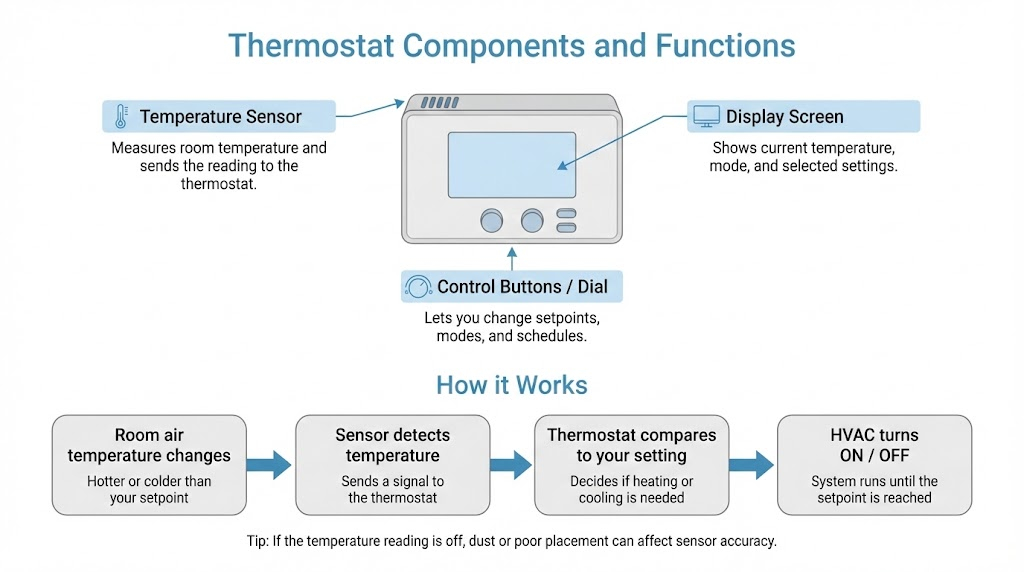
- Temperature Sensor: This is the heart of the thermostat. It constantly monitors the air temperature in your home and signals the HVAC system to turn on or off to maintain your chosen temperature settings.
- Display Screen: Most digital and programmable thermostats feature a clear display screen, showing current temperature, system status, and your selected settings. On smart thermostats, this screen may also provide advanced information like energy usage or Wi-Fi connectivity.
- Control Buttons or Dials: These allow you to adjust temperature settings, switch between heating and cooling modes, and set schedules. On programmable and smart thermostats, you’ll find additional controls for advanced features and custom settings.
Understanding these basic components helps you get the most out of your thermostat and HVAC system. If you ever notice issues with temperature accuracy or system response, knowing how these parts work together can make troubleshooting much easier. Keeping your thermostat’s components clean and in good working order ensures your HVAC system operates efficiently, keeping your home comfortable year-round.
What Does the Reset Button Actually Do?

The reset button is used to reset thermostat functions, clear errors, reboot the internal system, or restore factory defaults, depending on the model. If your device is malfunctioning, you may need to reset the thermostat to restore proper function. It’s useful for fixing:
- Frozen screens or unresponsive controls
- Incorrect or fluctuating temperatures
- Lost Wi-Fi or app connection (for smart thermostats)
- Malfunctions after a power outage
Note: Resetting a thermostat can help resolve these issues.
You’ll typically find the reset button:
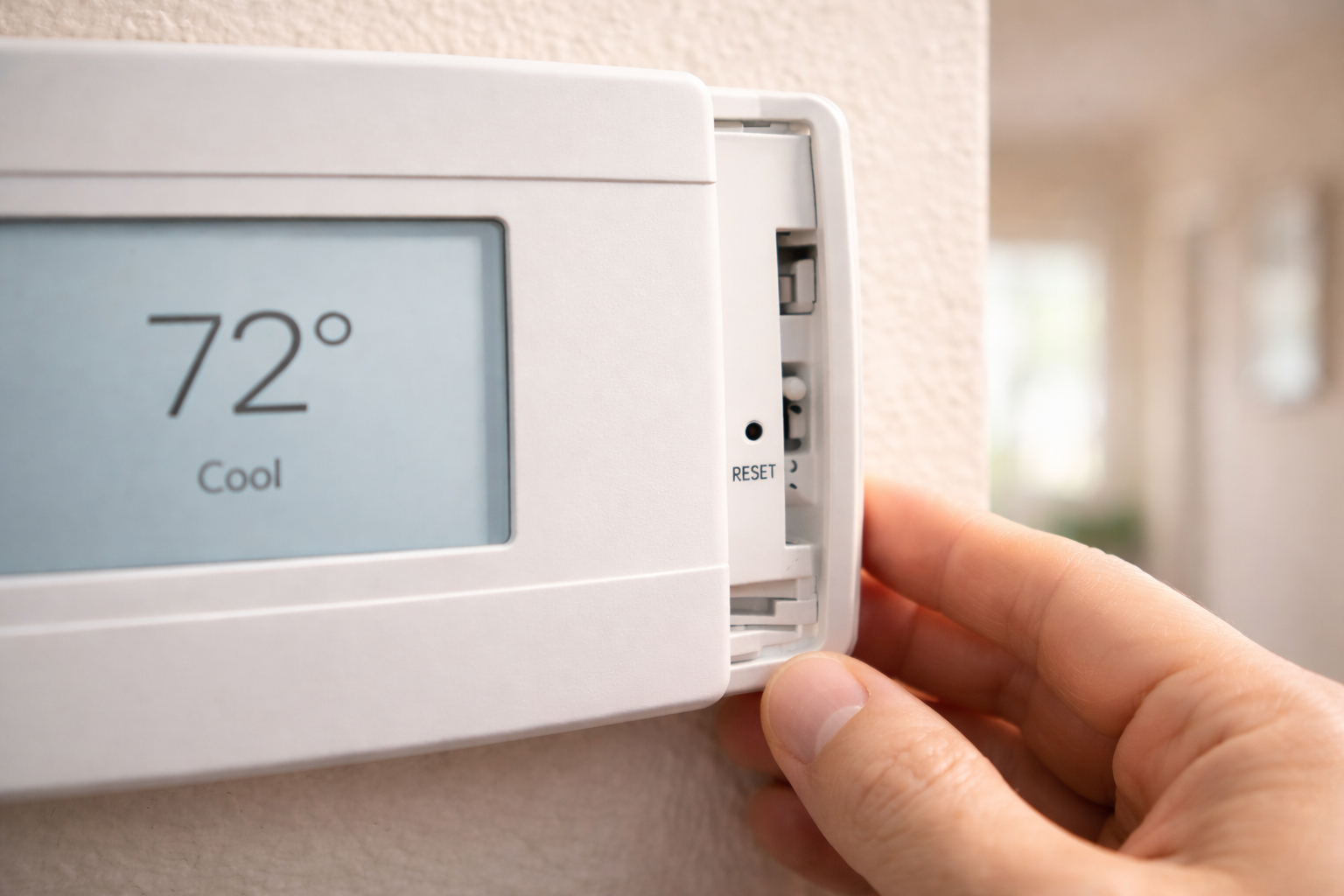
- Inside the front panel (requires removing the faceplate)
- On the thermostat touchscreen menu or directly on the thermostat screen
- Via a pinhole that needs a paperclip to access
To reset a thermostat, you may need to press or press and hold the reset button, sometimes using a tool like a paperclip. Pressing and holding the button for several seconds initiates the reset process. Always follow the manufacturer’s instructions to ensure a successful reset.
In some models, the reset process might require holding multiple buttons simultaneously.
Resetting a Honeywell Thermostat (Example)
Before starting, check your thermostat’s model number. This will help you find the correct reset procedure for your specific device. Always consult the owner’s manual or user manual for detailed instructions, as steps may vary by model.
Honeywell is one of the most common brands in Texas homes. Here’s a general reset procedure (always check your model’s guide):
- Power down your HVAC system at the breaker.
- Remove the thermostat faceplate to access the interior (for some models).
- Hold the reset button (or use the correct touchscreen sequence).
- Wait for the display to reboot – it may flash or go blank for a few seconds.
- Wait a few minutes before you restore power to the system to ensure any stored power is discharged.
- Reconfigure your settings (date, time, temperature schedule).
Remember, a factory reset erases all custom settings. Only use it if a soft reset doesn’t resolve the problem.
Troubleshooting Common Thermostat Issues
Some problems that a reset might solve:
- HVAC won’t turn on or off: You might notice the fan isn’t running, and the thermostat display is blank, indicating a lack of power or connection.
- The temperature doesn’t match your setting: The thermostat reads 70 degrees, but the room feels noticeably warmer or cooler, suggesting a reset might recalibrate the system.
- Thermostat stuck in hold or override mode: The screen displays “Hold” or “Override” despite schedule settings, preventing desired temperature adjustments.
- Wi-Fi disconnected (smart models only): The app shows “offline” status or fails to adjust the temperature remotely due to a lost connection.
If the problem persists after a reset, further troubleshooting may be needed.
Still stuck after a reset? Call a professional HVAC technician for diagnostic help. Professional assistance from an HVAC professional may be required for persistent or complex issues, or for other HVAC issues beyond the thermostat.
Factory Reset and Settings
- A factory reset restores a thermostat to its default settings, erasing custom temperature settings and preferences.
- Users must reconfigure their thermostat settings after a factory reset, including temperature preferences, scheduling, and advanced features.
- Understanding the reset process and factory settings is essential for maintaining your HVAC system’s efficiency, ensuring optimal performance, and preventing common issues.
- Smart thermostats often feature automated temperature adjustments and energy usage tracking, requiring users to reset the device or adjust settings to optimize performance.
- Regularly reviewing and adjusting thermostat settings helps ensure the system is functioning correctly, allowing users to save money and energy while maintaining a comfortable indoor environment.
Factory Reset vs Soft Reset
- Soft Reset: Clears recent errors, keeps your custom schedules. Best for glitches or power hiccups.
- Factory Reset: Wipes all data and restores the unit to default. Use when major issues persist or when changing ownership.
A smart thermostat like Ecobee or Nest often has both options available in its menu.
Non-Programmable Thermostats: Still Worth Resetting?
Absolutely. Even older dial or push-button thermostats, including a non-programmable digital thermostat or a mechanical thermostat, can benefit from a reset, especially after:
- A tripped circuit breaker
- Prolonged power outage
- Manual wiring work
These resets are usually done by switching the system off, disconnecting the power source, removing the thermostat from its base, waiting 30 seconds, then reattaching. For some models, you can simply turn the device off and back on to reset. Note that a non-programmable digital thermostat may require a different reset method, such as pressing a reset button or removing the batteries.
Tips for North Texas Homeowners

- Summer thunderstorms? Power surges can confuse thermostat logic. A reset might fix it.
- Cold snaps in Plano? If your heat won’t kick in, try resetting before replacing your thermostat.
- Having trouble with your air conditioning? Resetting your thermostat can often resolve common cooling issues and restore comfort.
- Upgrading your system? Don’t forget to reset your smart thermostat when connecting to a new furnace, AC unit, or cooling system—this helps your equipment run more efficiently.
- Using programmable or smart thermostats can help you save energy during extreme weather, reducing your energy costs.
Pro Tip: Prevent Future Issues with Regular Maintenance
Thermostats don’t need much upkeep, but here’s what you should do:
- Keep it dust-free. Clean with a soft cloth, and use a soft brush to gently clean the inside components of your thermostat.
- Check the batteries every 6–12 months and replace them if needed.
- Review your programming seasonally (especially in Texas, where temps swing fast!)
- Inspect wiring if you recently had electrical work done.
When to Call the Pros
Didn’t reset, fix it? Your thermostat might be signaling deeper HVAC issues – like a failing capacitor, broken control board, or faulty wiring. We can help with:
- Smart thermostat installation (Ecobee, Nest, Honeywell)
- Thermostat upgrades
- Full HVAC system diagnostics
Bottom Line: Don’t Ignore the Reset Button
A thermostat reset is a simple step that can fix a surprising number of HVAC headaches. Whether you have a smart Honeywell or a basic manual unit, knowing when and how to reset can save you time, stress, and money.
If resetting your thermostat doesn’t solve the issue – or you just want expert help – AirMatics is here to keep your comfort on track in any season.
